Official page is here.
http://googlewebmastercentral.blogspot.com/2007/04/requesting-removal-of-content-from-our.html
it’s part of the Google Webmaster Tools interface.
Google Releases Improved Content Removal Tools
Google has rolled out new tools to help people quickly
get content removed from its search engine. Those
targeted at site owners allow for speedy removal of
pages and cached copies of pages. Other tools allow
those to request the removal of images or links to
pages with personal information about themselves, in
the right circumstances. More on the tools and various
options are covered below.
For details:
http://searchengineland.com/070417-213813.php
Monday, April 23, 2007

Tuesday, April 10, 2007
What is a good click-through rate in Adwords?
From Pure Visibility's Pay Per Click Answers:
A good CTR is one that makes your keyphrase profitable. On average, Adwords accounts will have a CTR around 2.0%. E-commerce sites might have an average around 6%. Accounts where a company only bids on terms related to their trademark might have a CTR around 15%. CTR is not a good metric to use to determine the success of your account. It depends on the focus of your site, the average position of your ads, the types of keyphrases being bid on, and how often spam impressions are created (for checking ranks, or activities like this). It’s good to try to improve CTR in certain cases, but the question “what is a good click-through rate, is not a good question.” It’s better to ask, “How can I make my ad better.”More on this from the Pure Visibility site.
Technorati Tags: dodgeball
Monday, March 12, 2007
Posting to your blog from a mobile phone
See Blogger Mobile:
As indicated by the graphic above, sending an MMS or email to go@blogger.com will automatically create a new blog. Your photo, along with any text you add, will be uploaded to that blog right away and then we'll message you back with the address so you can visit your new blog on the web.
Friday, March 9, 2007
Level up: Google Gadgets API Developer Guide
Google Gadgets are lumps of code that can live either on your web page or on a Google customized home page. There's an application programming interface, documented here.
Level 1: find the API guide, marvel at complexity, leave it alone for now.
Level 1: find the API guide, marvel at complexity, leave it alone for now.
Level up: Adwords Keyword Tool
The Adwords Keyword Tool lets you build out estimates of keyword costs and traffic and to discover related terms for your advertising campaigns. It can also be used to collect ideas for related words for blogging, so that you get better Adsense traffic. For more on that see the 103bees article 5 simple steps to boost your Adsense income.
Level 1: try it out with the phrase "adwords keyword tool"; it returns
Level 1: try it out with the phrase "adwords keyword tool"; it returns
adwords keyword tool - - Add »
top paying adwords - - Add »
adwords make money - - Add »
adwords promotional code - - Add »
adwords click fraud - - Add »
keyword search engine   - - Add »

Hey, 5 new blog post titles!
Tuesday, March 6, 2007
Website Optimizer
From the help file for Website Optimizer
You want your ads to be successful. To measure that success, you use click and conversion tracking to gain insight into user behavior on your pages. If users are reaching your pages, but you aren't getting the conversion results you want, what do you do? It's time to make improvements to your site. Website Optimizer can help.
The Website Optimizer allows you to test changes in the website content of your pages in order to determine what will be most effective in getting conversions. You choose what parts of a page you'd like to test -- headline, image, promo text – and we'll run an experiment on a portion of your site traffic to determine which content on your site users respond to best. When we've collected enough data, we'll provide you with reliable reports and a suggested course of action in order to optimize your site for maximum business results.
Not installed anywhere yet.
Google Code Search and security vulnerabilities
Google Code Search is a specialized search engine on top of Google's database that lets you look for code. Unusual in this regard is that it supports regular expressions for search.
Level 1. Do a search for your own name, if you've written any code. A search for Vielmetti returns about 100 hits, including credits in Pine and GNU Emacs.
Level 2. Watch in amazement as Jose Nazario uses code search to audit for common security vulnerabilities. Lots of worst practices in evidence all over the net.
Level 1. Do a search for your own name, if you've written any code. A search for Vielmetti returns about 100 hits, including credits in Pine and GNU Emacs.
Level 2. Watch in amazement as Jose Nazario uses code search to audit for common security vulnerabilities. Lots of worst practices in evidence all over the net.
Level up: Google Talk for Blackberry
A mobile Jabber client for your Blackberry phone.
Level 1: download it from the Google Talk for Blackberry page. You'll want to pull this down from your phone, or download it from an IE browser and then install it as a Blackberry package. I did the over the air install a while ago.
Level 2: send me a Jabber message at edward.vielmetti@gmail.com .
Level 1: download it from the Google Talk for Blackberry page. You'll want to pull this down from your phone, or download it from an IE browser and then install it as a Blackberry package. I did the over the air install a while ago.
Level 2: send me a Jabber message at edward.vielmetti@gmail.com .
Leveling up: Picasa Web Albums Uploader
This is Mac software (is it Windows too?), a local upload tool for Picasa Web Albums.
Level 1: install it (as a part of the download from Picasa Web Albums)
Level 2: use it to upload a photo; in this case, I clipped the front page from Google Analytics for the first day's traffic for this blog. You can create a new album from within the uploader, and you can attach added information to the picture (a blob of text).
Level 3: paste that uploaded graphic into this blog.
Level 1: install it (as a part of the download from Picasa Web Albums)
Level 2: use it to upload a photo; in this case, I clipped the front page from Google Analytics for the first day's traffic for this blog. You can create a new album from within the uploader, and you can attach added information to the picture (a blob of text).
Level 3: paste that uploaded graphic into this blog.
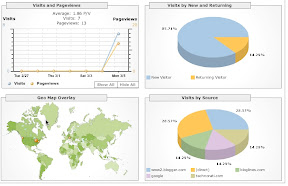 |
| From Google Analyt... |
Bad, bad server. No donut for you.
Orkut error message seen today.
Bad, bad server. No donut for you.
Unfortunately, the orkut.com server has acted out in an unexpected way. Hopefully, it will return to its helpful self if you try again in a few minutes.
It's likely that the server will behave this way on occasion during the coming months. We apologize for the inconvenience and for our server's lack of consideration for others.
Bad, bad server. No donut for you.
Unfortunately, the orkut.com server has acted out in an unexpected way. Hopefully, it will return to its helpful self if you try again in a few minutes.
It's likely that the server will behave this way on occasion during the coming months. We apologize for the inconvenience and for our server's lack of consideration for others.
Leveling up: Orkut
Orkut is Google's first social network application.
Level 1: sign in, create a profile. (did that a while ago).
Level 2: accumulate some friends. (also did that a while ago, back when it first came out and when it was the new hot network; viz. Ning right now, the urge to connect to anything new).
Level 3: create a community. I've set one up for a2b3, the weekly Thursday lunch group I organize in downtown Ann Arbor at Eastern Accents. Note that Orkut community name URLs are not short and tidy but long and obscure. (this is not the only a2b3 presence on the net, far from it; a Google search for a2b3 shows the current range. PLEEZ BEE MY FREND.
Level 4: there has to be, somewhere, a Firefox search plugin that lets you look up people's names on Orkut. Haven't found it yet. I find the similar LinkedIn people search plugin to be invaluable.
For more Orkut stuff, see the unofficial Orkut fan blog Inside Orkut.
Level 1: sign in, create a profile. (did that a while ago).
Level 2: accumulate some friends. (also did that a while ago, back when it first came out and when it was the new hot network; viz. Ning right now, the urge to connect to anything new).
Level 3: create a community. I've set one up for a2b3, the weekly Thursday lunch group I organize in downtown Ann Arbor at Eastern Accents. Note that Orkut community name URLs are not short and tidy but long and obscure. (this is not the only a2b3 presence on the net, far from it; a Google search for a2b3 shows the current range. PLEEZ BEE MY FREND.
Level 4: there has to be, somewhere, a Firefox search plugin that lets you look up people's names on Orkut. Haven't found it yet. I find the similar LinkedIn people search plugin to be invaluable.
For more Orkut stuff, see the unofficial Orkut fan blog Inside Orkut.
Checking in with Dodgeball Mobile
I couldn't find a place to check in for where I am with the regular old (old) Dodgeball screen, but the Dodgeball Mobile pages are compact and helpful. Check into Dodgeball here.
In comparison, Plazes has a little widget that keeps track of your location, so it knows where I am (but not what I'm up to) whenever I open up and connect to the net. Twitter is entirely freeform, and lends itself to haiku.
In comparison, Plazes has a little widget that keeps track of your location, so it knows where I am (but not what I'm up to) whenever I open up and connect to the net. Twitter is entirely freeform, and lends itself to haiku.
Leveling up: Picasa and Picasa Web Albums
Picasa is Google's photo service. It compares with Flickr and Yahoo Photos. I haven't used it - yet- but I'm getting started.
Level 1: connect to Picasa Web Albums and agree to the Terms of Service. (note to self: need to start collecting those terms of service).
Level 2: for the Mac, download the plugins that connect this to iPhoto. More details here.
It's apparently available "by invitation", so if you haven't heard of this yet, there might be a reason.
Level 3: upload a photo via the web interface. We'll start with my old Cisco badge.
Level 4: paste in a link to the photo to this page.
hey, that's what I used to look like!
Level 1: connect to Picasa Web Albums and agree to the Terms of Service. (note to self: need to start collecting those terms of service).
Level 2: for the Mac, download the plugins that connect this to iPhoto. More details here.
It's apparently available "by invitation", so if you haven't heard of this yet, there might be a reason.
Level 3: upload a photo via the web interface. We'll start with my old Cisco badge.
Level 4: paste in a link to the photo to this page.

hey, that's what I used to look like!
Leveling up: Google Maps for Mobile
You're in Washington DC heading somewhere that you know the address of, but you're going by Metro (if the Metro don't go there it don't exist). When you get out of the station you are confused - which way is north? which way is west?
Short of carrying a compass or a paper map with you, my best answer to this conundrum has recently been Google Maps for Mobile running on my current phone (a blackberry).
Level 1: install and download Google Maps for Mobile for your Blackberry. Visit http://www.google.com/gmm from your mobile device. Come back when you're done.
Industry note: some buzz on Techmeme today about the Google Phone, including a post on High Contrast about The Real Google Phone. It name checks Andy Rubin, founder of Danger and Android, and Mike Reid, originally of Skia, as leads on the project. Next step in this path will be to see if we can't find more Googlers on Orkut (but that's another step).
Short of carrying a compass or a paper map with you, my best answer to this conundrum has recently been Google Maps for Mobile running on my current phone (a blackberry).
Level 1: install and download Google Maps for Mobile for your Blackberry. Visit http://www.google.com/gmm from your mobile device. Come back when you're done.
Industry note: some buzz on Techmeme today about the Google Phone, including a post on High Contrast about The Real Google Phone. It name checks Andy Rubin, founder of Danger and Android, and Mike Reid, originally of Skia, as leads on the project. Next step in this path will be to see if we can't find more Googlers on Orkut (but that's another step).
Leveling up: Google Finance
Next step: Google Finance
If you ever used Yahoo Finance, the basic ideas are similar - it's a way to track your stock portfolio, keep track of industry news for publicly traded companies, and unusually to read blog postings on companies in question.
Level 1: connect to it, look at the home page. It has a (new to me) view of performance by sector, with red/green bars showing how the market is doing overall.
Level 2: do the simple search and look for the GOOG. Did you buy? Did you sell? It's a nice recap of industry news here.
Level 3, and this is a harder one: post a blog entry that gets picked up on this page. At the moment, the blog section includes links to pages in high pagerank sites like Gizmodo, including this article Google Phone to Resemble a Blackberry, Will Run On Multiple Carriers. At some point I'll figure out the best way to get your blog post linked to the appropriate page for a stock, unlikely that you or I will get on the GOOG's page, but for more thinly traded stocks this should be possible. The google phone is supposedly codenamed "Switch", but I'm tagging it here as Google Phone just to be bland.
If you ever used Yahoo Finance, the basic ideas are similar - it's a way to track your stock portfolio, keep track of industry news for publicly traded companies, and unusually to read blog postings on companies in question.
Level 1: connect to it, look at the home page. It has a (new to me) view of performance by sector, with red/green bars showing how the market is doing overall.
Level 2: do the simple search and look for the GOOG. Did you buy? Did you sell? It's a nice recap of industry news here.
Level 3, and this is a harder one: post a blog entry that gets picked up on this page. At the moment, the blog section includes links to pages in high pagerank sites like Gizmodo, including this article Google Phone to Resemble a Blackberry, Will Run On Multiple Carriers. At some point I'll figure out the best way to get your blog post linked to the appropriate page for a stock, unlikely that you or I will get on the GOOG's page, but for more thinly traded stocks this should be possible. The google phone is supposedly codenamed "Switch", but I'm tagging it here as Google Phone just to be bland.
Leveling up: Gmail, and keeping your Gmail inbox size under control
The first few levels are easy:
Level 1: create an account. That got done a long time ago.
Level 2: receive some mail. At the moment, the inbox is 75% full. That's too full.
Level 3: delete some mail. In particular, I'm going to look for mail with attached pictures, and the goal is to whack back 5% of the inbox. Emptying the trash brought the total back to 74%. Searching for "has:attachment movie" helped winnow back some, but not really very much. I don't know how to search for messages by size - it would be nice to be able to sort by size, but you can't.
Some suggestions on "Keeping your Gmail inbox size under control" at Digital Inspiration from Amit Agarwal:
Level 1: create an account. That got done a long time ago.
Level 2: receive some mail. At the moment, the inbox is 75% full. That's too full.
Level 3: delete some mail. In particular, I'm going to look for mail with attached pictures, and the goal is to whack back 5% of the inbox. Emptying the trash brought the total back to 74%. Searching for "has:attachment movie" helped winnow back some, but not really very much. I don't know how to search for messages by size - it would be nice to be able to sort by size, but you can't.
Some suggestions on "Keeping your Gmail inbox size under control" at Digital Inspiration from Amit Agarwal:
- search for "has:attachment from:me label:sent" offers opportunities for improvement
- attachments of a particular type are visible with "filename:jpg" or "filename:mp3"
Monday, March 5, 2007
Waiting for my Adsense account to be approved
By checking this box and clicking on the I Accept button, you agree that you have read, understand and accept the Terms and Conditions, the Program Policies, and the Frequently Asked Questions for participation in Google AdSense. If you do not agree to these Terms and Conditions, you will not be able to participate in this program.My old Adsense account was through a different name (why? because I didn't understand. and now I do.) So I have to go through the whole account review process before I can get through to serving up real ads.
When the new account is approved I'll move the tracking codes from my main blog to use this new one. Hopefully I won't strand very many clicks along the way.
Leveling up: Google Adsense
Adsense is the part of Google Adwords that pays out dribs and drabs of money to aspiring bloggers, and gives them valuable feedback as to how well their writing is attracting relevant and profitable ads.
Level one, set up the account. Got it.
Level two - and this is skipping ahead a little bit - get a check in the mail from Google. One arrived today. On the scale iTunes, iPod, iMac it was in the middle, and they don't come all that often. We'll be working to get the next one as a piece of this.
Level three (in progress), add Adsense to this blog. That was easy! Go into "template", add the Adsense widget, it configures everything for you. At one point it burped complaining about a missing client_id, so I deleted the block and started over again. I won't really count it until the ads start running real content and not public service ads, but that's not too bad.
(Go up a level in Blogger too while I'm at it.)
Level one, set up the account. Got it.
Level two - and this is skipping ahead a little bit - get a check in the mail from Google. One arrived today. On the scale iTunes, iPod, iMac it was in the middle, and they don't come all that often. We'll be working to get the next one as a piece of this.
Level three (in progress), add Adsense to this blog. That was easy! Go into "template", add the Adsense widget, it configures everything for you. At one point it burped complaining about a missing client_id, so I deleted the block and started over again. I won't really count it until the ads start running real content and not public service ads, but that's not too bad.
(Go up a level in Blogger too while I'm at it.)
Leveling up: Google Calendar
Google Calendar. Keep track of events in your lives and in other people's lives. Related: Eventful, upcoming.org (a Yahoo production)
Level 1, create an account. Got it already.
Level 2, search through the public calendars to see what people have entered for an event you are going to. (or wish you were going to). In this case we'll try the canonical geek spring break search, sxsw party. Zoom, 48 hits for Mar 5 and later.
Level 3, search through the public calendars for your own name to see what has leaked out. Woops, too much. No leveling up until that is all fixed.
Level 1, create an account. Got it already.
Level 2, search through the public calendars to see what people have entered for an event you are going to. (or wish you were going to). In this case we'll try the canonical geek spring break search, sxsw party. Zoom, 48 hits for Mar 5 and later.
Level 3, search through the public calendars for your own name to see what has leaked out. Woops, too much. No leveling up until that is all fixed.
Leveling up: Dodgeball
Working my way through all the google apps. The next one is Dodgeball. Just like in other massively multiplayer online games, one goal here is to build out your guild so that you can...go drinking.
The category if you need one is "mobile social software". Similar but not the same: Plazes, Twitter.
Level one: create a login. Already done.
Level 2: someone wants to be your friend. Woo hoo! A friend. Now I have three (lame).
Level 3: create a location for where you are (for me that's work right now). Done. Sweet little map shows up to pinpoint it. I set it as "private" because there's no drinking during office hours.
Level 4: Dodgeball Mobile. Sign in with your google account, check in, add a "shout". One friend in Detroit go it, it says.
The category if you need one is "mobile social software". Similar but not the same: Plazes, Twitter.
Level one: create a login. Already done.
Level 2: someone wants to be your friend. Woo hoo! A friend. Now I have three (lame).
Level 3: create a location for where you are (for me that's work right now). Done. Sweet little map shows up to pinpoint it. I set it as "private" because there's no drinking during office hours.
Level 4: Dodgeball Mobile. Sign in with your google account, check in, add a "shout". One friend in Detroit go it, it says.
Leveling up: Google Sets
Next tool: Google sets.
Not many levels in this one. First thing to do is to fill in the blanks with five names and get a list back of related terms. How are they related? It says:
Automatically create sets of items from a few examples.
Yeah, right. I put in a few words that I wanted it to expand on, expecting results similar to what I'd get from Google Adwords suggested terms - no joy.
I'll take level 1 for finding it and for running the sample queries, but not level 2 yet.
Not many levels in this one. First thing to do is to fill in the blanks with five names and get a list back of related terms. How are they related? It says:
Automatically create sets of items from a few examples.
Yeah, right. I put in a few words that I wanted it to expand on, expecting results similar to what I'd get from Google Adwords suggested terms - no joy.
I'll take level 1 for finding it and for running the sample queries, but not level 2 yet.
Leveling up: Google Analytics
Next thing to level up on is Google Analytics.
First thing is to install basic analytics for this blog. Create the module that lets you do that. It probably also counts as a level up in Blogger too, but we'll count one thing at a time.
Future up-levels will throw in conversion tracking and goals and more stuff, but again, one thing at a time.
I had an existing Analytics account, so no need to create a new one. Add this new one, watch it generate the code block for urchintracker, create an HTML block in the new blog template, it appears to be there. But Analytics is not confirming that it's there for some reason...did the page not get updated right away, is there a cache? hmm.
Looks like it was only temporary! Now it's valid.
Analytics has been successfully installed and data is being gathered now.
First thing is to install basic analytics for this blog. Create the module that lets you do that. It probably also counts as a level up in Blogger too, but we'll count one thing at a time.
Future up-levels will throw in conversion tracking and goals and more stuff, but again, one thing at a time.
I had an existing Analytics account, so no need to create a new one. Add this new one, watch it generate the code block for urchintracker, create an HTML block in the new blog template, it appears to be there. But Analytics is not confirming that it's there for some reason...did the page not get updated right away, is there a cache? hmm.
Looks like it was only temporary! Now it's valid.
Analytics has been successfully installed and data is being gathered now.
Leveling up: Blogger
Start the process of leveling up in Blogger by creating a new blog (namely, this one). It's currently set up with a default template, no analytics, no widgets, no etc etc but it is running. That gets me to level 1.
Somewhere in space in time are all of my old Blogger blogs, but they aren't currently connected to this blog.
It only makes sense to run the World of Googlecraft blog on a Google property - even though my main blog is on Typepad - eat your own dogfood and all that.
Somewhere in space in time are all of my old Blogger blogs, but they aren't currently connected to this blog.
It only makes sense to run the World of Googlecraft blog on a Google property - even though my main blog is on Typepad - eat your own dogfood and all that.
Subscribe to:
Posts (Atom)
